Design Docs

Change the design of your CRM Page
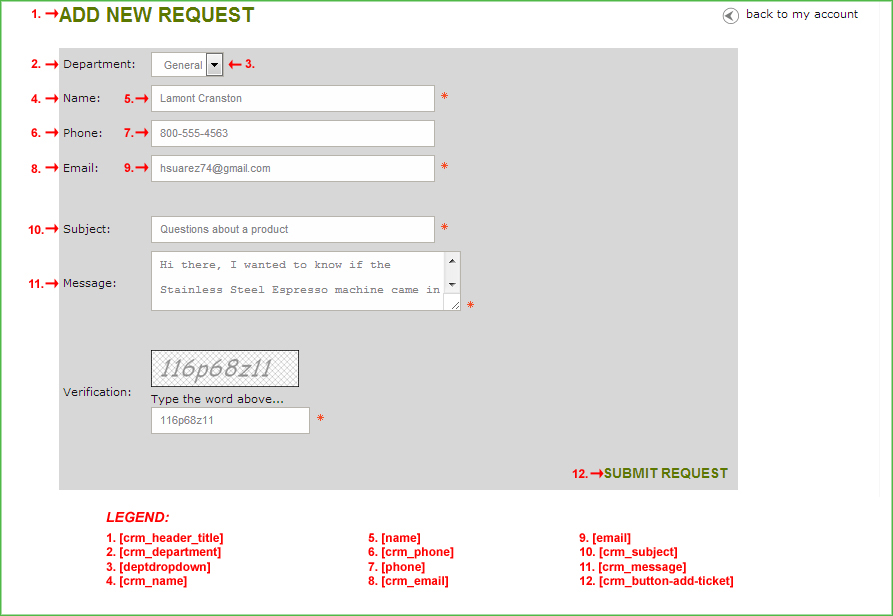
Purpose: This HTML template defines the layout of the Customer Relationship Manager (CRM) page when customers create a new request from their My Account page.
Notes: This template is almost identical to the contact_us.html template in that it contains the basic CRM form. However, this page is specifically invoked when clicking on the "Add Request" link in the customer's "My Account" page.
Note: It is important to preserve the commented tags to ensure the software performs correctly.
For example:
      [crm_name]
      [crm_email]
      [crm_subject]
      [crm_message]
    <!--START: captchascript-->
    <!--END: captchascript-->
      [crm_header_title]
    <!--START: myAccount-->
    <!--END: myAccount-->
    <!--START: CATEGORY_HEADER-->
      [CONTENT]
    <!--END: CATEGORY_HEADER-->
      [custid]
      [orderid]
      [productid]
      [crm_department]
      [deptdropdown]
      [crm_name]
      [name]
      [crm_phone]
      [phone]
      [crm_email]
      [email]
      [crm_subject]
      [crm_message]
    <!--START: captcha-->
    <!--END: captcha-->
      [crm_button-add-ticket]
    <!--START: CATEGORY_FOOTER-->
      [CONTENT]
    <!--END: CATEGORY_FOOTER-->
Note: Code blocks and their respective variables will only work with specific template pages.
Note: Many of the following variables are dynamically inserted from your cart's Settings ->Design ->Store Language section.