Design Docs

Change the design of your Registration Page
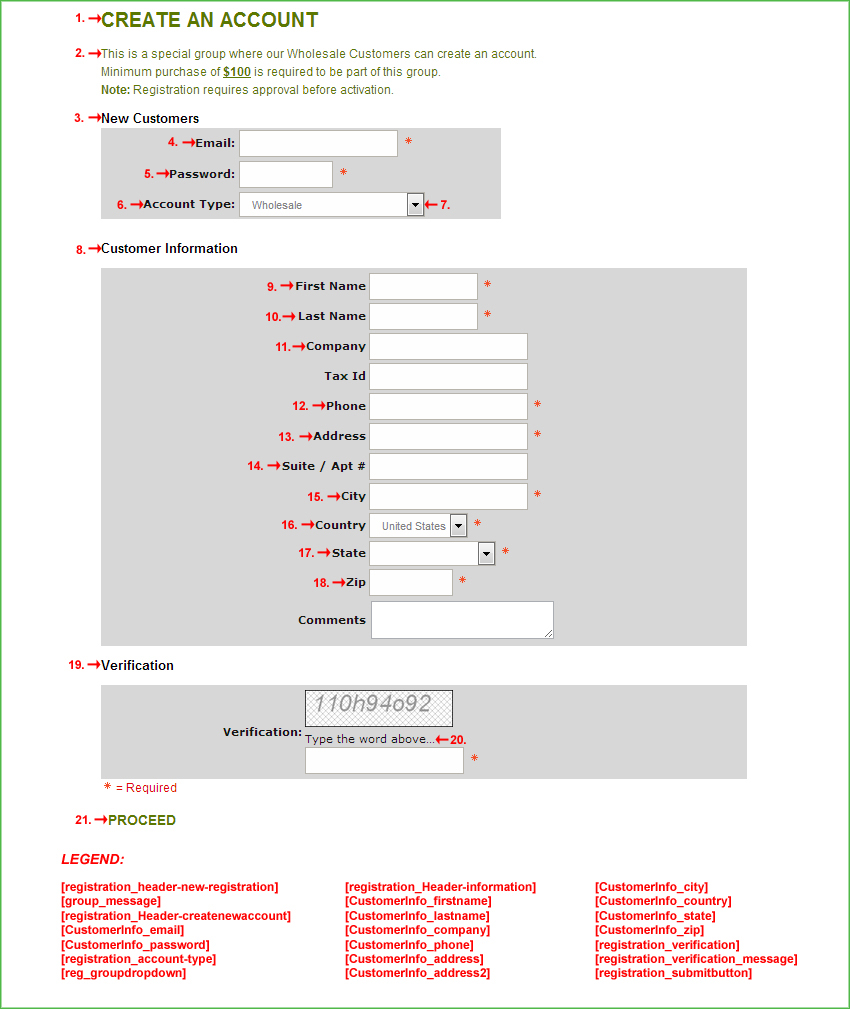
Purpose: This template applies when shoppers are registering a customer record within the store.
Note: It is important to preserve the commented tags to ensure the software performs correctly.
For example:
        [view_cart]
        [catalogid]
        [registration_header-new-registration]
    <!--START: CATEGORY_HEADER-->
        [CONTENT]
    <!--END: CATEGORY_HEADER-->
        [group_message]
    <!--start create account block-->
        [registration_Header-createnewaccount]
        [CustomerInfo_email]
        <!--START: emailrequired-->
          <!--START: req_email-->
          <!--END: req_email-->
        <!--END: emailrequired-->
          [CustomerInfo_password]
        <!--START: passwordrequired-->
          <!--START: req_pass-->
          <!--END: req_pass-->
        <!--END: passwordrequired-->
        <!--START: account_type-->
          [registration_account-type]
          [reg_groupdropdown]
        <!--END: account_type-->
      <!--END: account_login-->
    <!--end create account block-->
    <!--start shipping block-->
      <!--START: required_fields-->
      <!--END: required_fields-->
        [registration_Header-information]
        [CustomerInfo_firstname]
      <!--START: req_shipping_firstname-->
      <!--END: req_shipping_firstname-->
        [CustomerInfo_lastname]
      <!--START: req_shipping_lastname-->
      <!--END: req_shipping_lastname-->
        [CustomerInfo_company]
        [CustomerInfo_phone]
      <!--START: req_shipping_phone-->
      <!--END: req_shipping_phone-->
        [CustomerInfo_address]
      <!--START: req_shipping_address-->
      <!--END: req_shipping_address-->
        [CustomerInfo_address2]
        [CustomerInfo_city]
      <!--START: req_shipping_city-->
      <!--END: req_shipping_city-->
        [CustomerInfo_country]
      <!--START: req_shipping_country-->
      <!--END: req_shipping_country-->
        [CustomerInfo_state]
      <!--START: req_shipping_state-->
      <!--END: req_shipping_state-->
        [CustomerInfo_zip]
      <!--START: req_shipping_zip-->
      <!--END: req_shipping_zip-->
        [registration_verification]
        [registration_verification]
        [registration_verification_message]
    <!-- end shipping block-->
        [registration_submitbutton]
    <!--START: CATEGORY_FOOTER-->
        [CONTENT]
    <!--END: CATEGORY_FOOTER-->
        [defaultCountry]
        [CustomerInfo_email*script]
        [CustomerInfo_email*script]
        [CustomerInfo_password*script]
        [CustomerInfo_password*script]
        [CustomerInfo_firstname*script]
        [CustomerInfo_firstname*script]
        [CustomerInfo_lastname*script]
        [CustomerInfo_lastname*script]
        [CustomerInfo_phone*script]
        [CustomerInfo_phone*script]
        [CustomerInfo_address*script]
        [CustomerInfo_address*script]
        [CustomerInfo_city*script]
        [CustomerInfo_city*script]
        [CustomerInfo_state*script]
        [CustomerInfo_state*script]
        [CustomerInfo_zip*script]
        [CustomerInfo_zip*script]
        [registration_verification*script]
Note: Code blocks and their respective variables will only work with specific template pages.
Note: Many of the following variables are dynamically inserted from your cart's Settings ->Design ->Store Language section.
Also, this template will contain special javascript validation at the end to validate data entered on the registration form.
These next variables will be used by the template's validation script to ensure properly formatted information is entered. It is best to leave these variables intact to ensure software functions properly.