Design Docs

Change the design of your Search Pages
Purpose: This is the template that will display when search is enabled for site content pages, and the search results yield more results. When this happens, a link labeled "More Results" will display. Clicking on this link will display a list of additional result pages which is controled by this template.
Note: It is important to preserve the commented tags to ensure the software performs correctly.
For example:
    <!--START: CATEGORY_HEADER-->
        [CONTENT]
    <!--END: CATEGORY_HEADER-->
    <!--START: SEARCH_PAGES-->
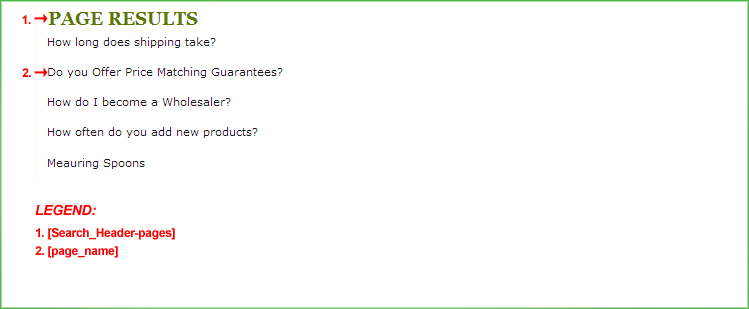
        [Search_Header-pages]
      <!--START: PAGING-->
        [category_moreresults]
        <!--START: PREV-->
          [keyword]
          [sortby]
          [prev]
          [category_previouspage]
        <!--END: PREV-->
        <!--START: PAGES-->
          <!--START: FIRST_PAGE-->
            [keyword]
            [PAGE]
          <!--END: FIRST_PAGE-->
          <!--START: PAGES_SELECTED-->
            [PAGE]
          <!--END: PAGES_SELECTED-->
          <!--START: PAGES_NOTSELECTED-->
            [keyword]
            [sortby]
          <!--END: PAGES_NOTSELECTED-->
          <!--START: LAST_PAGE-->
            [keyword]
            [sortby]
            [PAGE]
          <!--END: LAST_PAGE-->
        <!--END: PAGES-->
        <!--START: NEXT-->
          [keyword]
          [sortby]
          [next]
          [category_nextpage]
        <!--END: NEXT-->
      <!--END: PAGING-->
      <!--START: SEARCH_PAGES_FORMAT-->
        [page_link]
        [page_name]
        [page_content]
      <!--END: SEARCH_PAGES_FORMAT-->
      <!--START: PAGING-->
        [category_moreresults]
        <!--START: PREV-->
          [keyword]
          [sortby]
          [prev]
          [category_previouspage]
        <!--END: PREV-->
        <!--START: PAGES-->
          <!--START: FIRST_PAGE-->
            [keyword]
            [PAGE]
          <!--END: FIRST_PAGE-->
          <!--START: PAGES_SELECTED-->
            [PAGE]
          <!--END: PAGES_SELECTED-->
          <!--START: PAGES_NOTSELECTED-->
            [keyword]
            [sortby]
          <!--END: PAGES_NOTSELECTED-->
          <!--START: LAST_PAGE-->
            [keyword]
            [sortby]
            [PAGE]
          <!--END: LAST_PAGE-->
        <!--END: PAGES-->
        <!--START: NEXT-->
          [keyword]
          [sortby]
          [next]
          [category_nextpage]
        <!--END: NEXT-->
      <!--END: PAGING-->
    <!--END: SEARCH_PAGES-->
    <!--START: NO_RESULTS-->
        [Search_no-results]
    <!--END: NO_RESULTS-->
    <!--START: CATEGORY_FOOTER-->
        [CONTENT]
    <!--END: CATEGORY_FOOTER-->
Note: Code blocks and their respective variables will only work with specific template pages.
Note: Several of these variables are used in multiple places on the page, with their dynamic content controlled by the code block used in each instance.